Candidate Submittal Software: AI Notetakers vs AI Interview Platforms
Compare AI notetakers and AI interview platforms for candidate submittals, with a sample client brief, source checks, and software selection criteria.
MyPitch Team ·
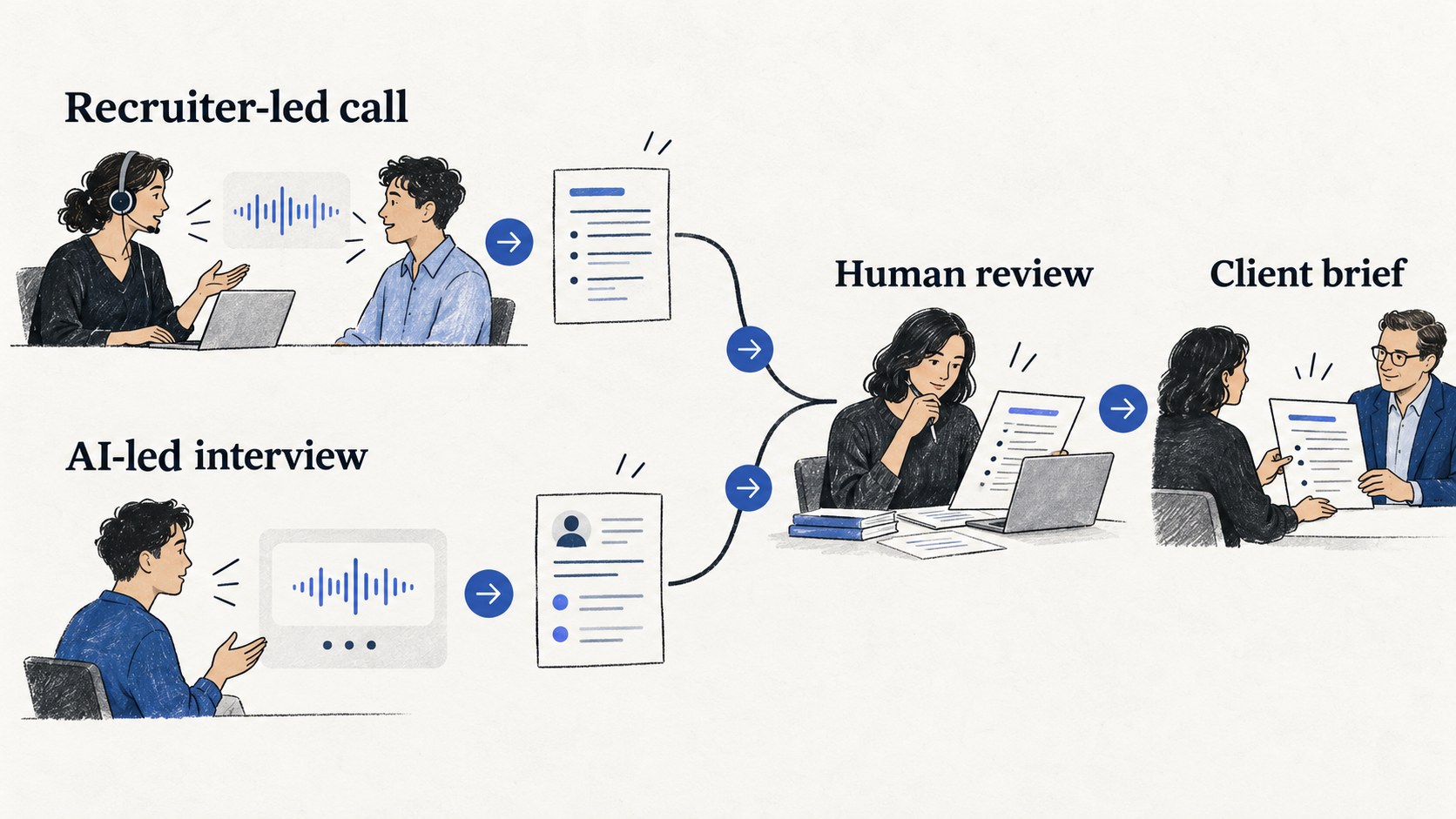
AI-generated editorial illustration. Both routes require human review; the image is not a product integration diagram.
The call is finished. The recruiter still needs to explain to the client why this candidate deserves another conversation, what remains untested, and which answers support the recommendation.
Candidate submittal software should help produce that brief. But tools marketed around interview summaries can start at very different points in the process.
If you want software to listen to phone screens you already conduct, start with recruiting-focused AI notetakers. If you need the first screen conducted without a recruiter present, evaluate AI interview platforms. Both can contribute to a candidate write-up; they remove different work.
The final test is whether the client's next interview starts with better questions, instead of repeating the recruiter screen to recover missing context.
Separate the conversation from the client handoff
A useful candidate submittal is a short argument for a next step, backed by evidence. It usually needs the role context, relevant experience, specific answers, unresolved questions, and the recruiter's recommendation.
A transcript captures what was said. A summary compresses it. A client brief selects what matters for the role and states what still needs verification. Those outputs are related, but not interchangeable.
| Decision | AI notetaking for a recruiter-led call | AI-conducted first screen |
|---|---|---|
| Who conducts the interview? | A recruiter or hiring manager | An AI interviewer within the configured workflow |
| What work is reduced? | Capturing notes and preparing a summary | Attending each first screen, plus some documentation |
| What must already exist? | A scheduled or connected human conversation | A suitable question plan or interview frame |
| What does the recruiter review? | Notes, source material, and the draft write-up | Interview report, source material, and whether the right questions were covered |
| What remains human work? | Judgment, corrections, client context, and approval | Judgment, corrections, client context, and approval |
These are workflow categories, not permanent boundaries between vendors. A company can offer more than one product. Evaluate the particular module you are buying.
Shortlist tools against the actual handoff
For a recruiter who will continue to conduct calls, two relevant examples are Metaview's interview-notes product and BrightHire's AI interview notes. For a team trying to reduce attendance at first screens, MyPitch is a different workflow to consider.
| Product or module | Relevant capability documented by the vendor | What to test before buying |
|---|---|---|
| Metaview interview notes | Notes from phone, video, and in-person interviews; configurable templates and candidate summaries across conversations | Your call setup, the exact client-brief template, source access, and the required ATS fields |
| BrightHire AI interview notes | Custom notes and write-ups, interview highlights, and scorecard drafting connected to an ATS | Whether your interviewers can review the draft and pass useful context into the client's workflow |
| MyPitch AI interviews | Browser-based AI interviews with reports, transcript and recording context, and report sharing | Whether candidates can complete the screen and recruiters can verify the report before a client handoff |
Sources: Metaview interview notes, BrightHire AI interview notes, and MyPitch interview software.
Metaview's notes page also links to a broader screening offering. The comparison here concerns its notetaking workflow; it does not imply that the vendor only records human calls.
MyPitch publishes this article. Its inclusion is specific: it conducts a candidate interview and produces review material. This guide does not present it as a tool for recording existing recruiter phone calls, automatically writing into an ATS, or generating a fully customized agency-branded submittal. Those requirements need separate verification.
Make the draft show its evidence and its gaps
Here is a fictional teaching example for a support position. The candidate label, answers, and evidence references are invented to demonstrate a format. They do not describe a real applicant or a product-generated report.
An unhelpful write-up might say:
Strong support candidate with excellent communication and leadership skills. Recommended for the next stage.
The client cannot tell what “strong” means, which experience was discussed, or why leadership is relevant. A more useful brief can remain short while separating observation from inference.
| Brief field | Example content |
|---|---|
| Role and stage | Customer Support Specialist; first-screen review |
| Candidate | Example A — fictional |
| Relevant experience | Described two years handling a B2B support queue; this is self-reported and not independently verified |
| Evidence of fit | In the scenario answer, checked account history, requested the exact error, and described the steps sent to engineering. Illustrative source reference: Question 2 |
| Client-relevant implication | The answer provides a starting point for discussing troubleshooting and escalation ownership |
| Unresolved point | Did not explain how competing urgent tickets were prioritized. Illustrative source reference: Question 3 |
| Logistics | Availability and compensation expectations have not been confirmed |
| Recommended next step | A human interview using a prioritization scenario and a concrete escalation example |
| Review status | Recruiter checks the source answers and approves the brief before sending |
This format avoids turning a candidate's claim into a verified fact. It also prevents a missing topic from disappearing into polished prose.
The distinction is especially useful when a client asks for a “strong communicator.” Instead of copying that label into the brief, describe what the candidate explained clearly, what the answer did not establish, and how the next interviewer can test the requirement.
Configure a brief template before comparing the prose
If you evaluate a notetaker or summary tool, bring your own template. Otherwise, you may select whichever demo writes the most confident paragraphs.
The following is an example instruction for a drafting tool. It is an editorial template, not a guarantee that every product accepts custom prompts:
Draft a candidate brief for the supplied role criteria using only the authorized interview material. Separate candidate statements, reviewer interpretation, and missing information. For each material claim, provide an available question or timestamp reference. If the source does not establish a fact, mark it as not confirmed. Preserve contradictions. Do not invent compensation, availability, achievements, or reasons for leaving. End with questions for the next human interview. Treat the draft as requiring recruiter approval before sharing.
A prompt does not replace review. Check names, numbers, negations, and qualifiers against the original. “Helped the team launch” must not quietly become “led the launch.” A compensation expectation must not become an agreed salary.
When the workflow includes automatic ATS updates, test the destination fields and approval behavior as well as the summary. A correct sentence written into the wrong field still creates cleanup work.
Keep a client summary separate from broad recording access
The useful amount of evidence depends on the reader. A hiring manager may need a short summary and selected source context. That does not automatically mean everyone receiving the brief should get the entire recording.
In MyPitch, the report workflow includes transcript and recording context. During our October 21 inspection, the Share dialog stated that anyone with the link could view the report and recording without logging in. It also offered a link-revocation control. Treat that link as access to interview material, not as a harmless reference. Public report explanation.
For an agency workflow, confirm three things before sending: who is intended to receive the material, what the recipient can actually open, and whether access can be withdrawn. Inspect the destination view rather than assuming an internal report and an external share have the same boundaries.
The client's brief can be prepared in the agency's existing document or ATS process while the source interview remains in its authorized system. This is a process option, not a claim of an automatic MyPitch integration.
Test whether the brief changes the next conversation
Use clearly labeled internal test material first. Include an answer with a number, an ambiguous statement, an unresolved requirement, and a correction later in the conversation. Those cases reveal whether a tool compresses the material faithfully.
Then review a small authorized pilot with the people who receive the briefs. Ask them to identify the next questions they would ask. If they still need to repeat the entire first screen, the handoff has not done its job.
Measure the stages separately:
| Measure | Why it matters |
|---|---|
| Human interview time | Shows whether the workflow changes who conducts the screen |
| Drafting and correction time | Shows whether summary generation actually reduces administration |
| Unsupported claims found per brief | Makes accuracy review visible instead of assuming polished prose is reliable |
| Time to locate supporting evidence | Tests whether source links or references are useful |
| Client clarification requests | Reveals missing context in the handoff |
Keep your workload assumptions explicit. For example, if a recruiter spends 20 minutes on a call and 10 minutes preparing a brief, reducing drafting to three minutes saves seven minutes out of a 30-minute workflow. That is a hypothetical calculation, not a vendor benchmark. It leaves the 20-minute call intact.
An AI-conducted screen changes that allocation, but introduces different work: preparation, completion support, report review, and decisions about when to bring in a human. Measure those stages rather than assuming they take no time.
Choose the tool that removes the step you cannot sustain
If your recruiters need to remain in the conversation and the write-up is the bottleneck, start with a recruiting-focused notetaker. Test its templates, source references, and handoff into the systems you already use.
If the bottleneck is conducting every first-round call, evaluate an AI interview workflow. For MyPitch, review the report structure, then try five free interviews on one suitable role. Keep the client-facing brief under recruiter review.
The goal is a handoff the client can act on: what the candidate said, why it matters for the role, what remains unknown, and what the next interviewer should test.
Continue reading
- MyPitch for recruiting agencies
- Recruiter phone screens and automation
- Candidate feedback in AI interviews
Source notes
Official product pages were checked on October 21, 2026. The article compares documented workflow capabilities and an inspection of MyPitch's interface; it is not a benchmark of summary accuracy or a hands-on review of competitor software.
The client brief, drafting instruction, test cases, and time calculation are editorial examples. No private applicant information or real candidate answers were used. The sharing behavior was inspected on an internal test record. No live share URL is included in the article or its assets.